
Know every customer before you reply
WACRM Contacts CRM is the customer list behind your WhatsApp number that helps your team reply with context: each contact keeps its labels, internal notes, tickets and consent status in one place, right next to the WhatsApp conversation in the inbox, and you can import the list you already have in one step.
By the WACRM team Updated
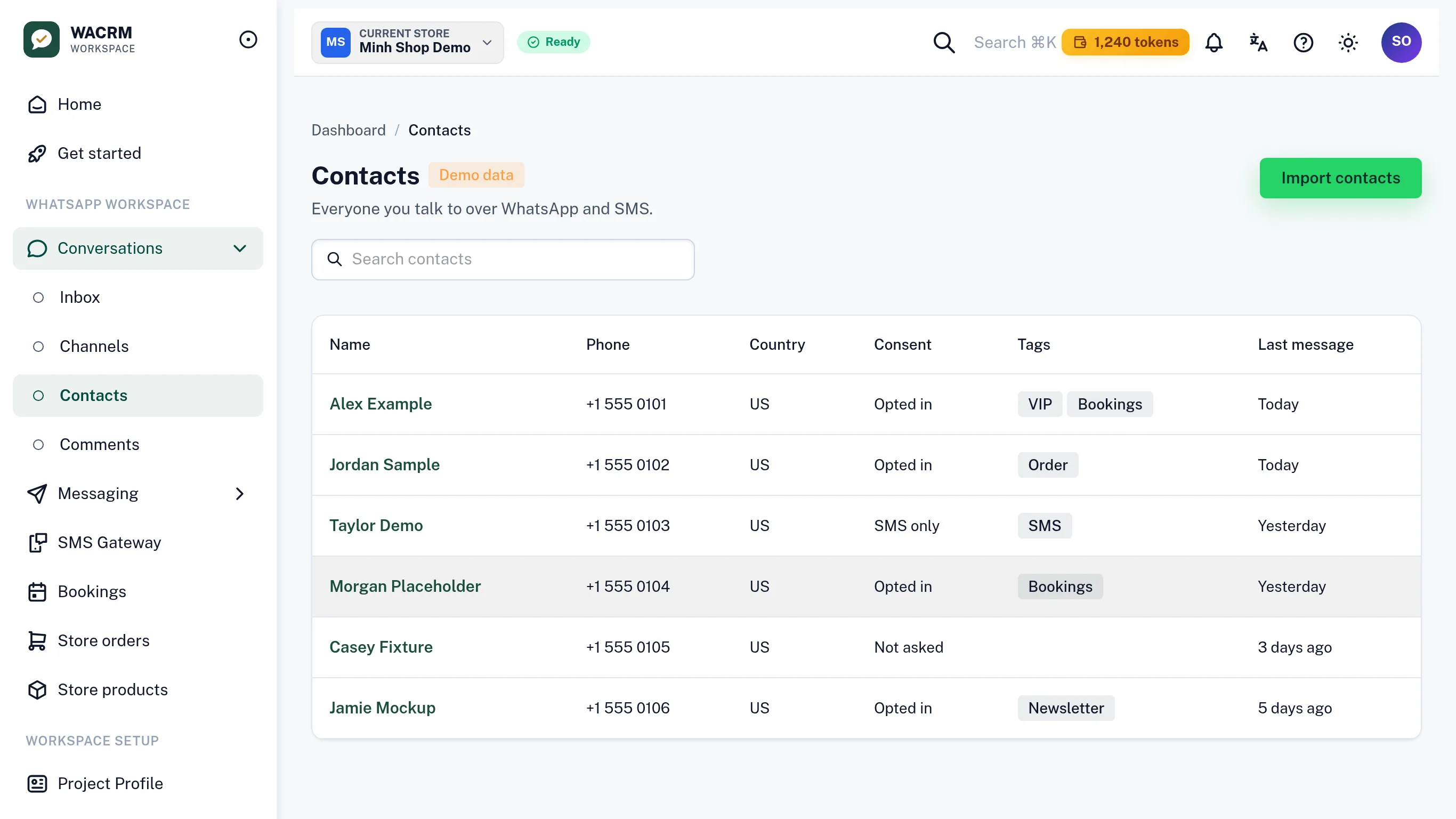
One contact record per customer, linked to their WhatsApp conversation
Labels to group customers, notes for your team, tickets for follow-up
Consent (opt-in / opt-out) recorded on every contact
Import your existing list in bulk; search and page through thousands
2,000 contacts on Premium, 10,000 on Advanced, unlimited on Pro
How does the contacts CRM work?
Connect your number
Every customer who writes to your connected WhatsApp number gets a contact record automatically.
Import your list
Bring the customer list you already have in one bulk import; existing contacts are updated, not duplicated.
Label and note
Add labels, write internal notes and open tickets from the contact panel, right next to the conversation.
Reply with context
When the customer writes again, the inbox shows who they are, what they asked before and whether they agreed to receive messages.
What do you get in each contact record?
Conversation in context
The contact panel sits beside the chat in the shared inbox, so anyone on the team can pick up the thread.
Labels for segments
Group contacts with your own labels, so clinics, shops or agencies find the right customers in seconds.
Internal notes
Notes are visible to your team only and never sent to the customer.
Tickets for follow-up
Turn a request into a ticket on the contact so it is tracked until someone closes it.
Consent on record
Opt-in and opt-out decisions are stored per contact, the way WhatsApp's business policy expects.
AI lead insight
An AI lead insight on the contact page highlights what the customer wants, so the reply starts from the right point.
Who keeps their customers in WACRM Contacts?

Clinics
Label patients by treatment and keep a note of the last visit before the next reminder goes out.

Shops and boutiques
See past questions and orders next to the chat, so a repeat customer never explains twice.

Real estate advisers
Tag every lead by area and budget and open a ticket for each viewing to follow up.

Agencies
Keep one clean contact list per client workspace, with notes the whole team can read.
Why does a WhatsApp business need a contact list of its own?
The WhatsApp Business app keeps chats, not customers. Once more than one person answers, nobody remembers who asked about a price last week, who already booked, or who said they no longer want messages. Context lives in one person's head or phone, and leaves with them.
WACRM keeps that context on the contact itself. Labels, notes and tickets sit next to the conversation, and the consent status is recorded on every contact, so a broadcast only goes to people who agreed to receive it, which is what Meta asks every business on the WhatsApp Business Platform to do.
How many contacts can I keep?
Premium includes 2,000 contacts, Advanced 10,000, and Pro has no contact limit. When your customer list grows, you move up a plan at any time from the Workspace and keep every contact.
Questions about contacts in WACRM?
Can I import the customer list I already have?
Yes. The Contacts screen has a bulk import: new numbers become new contacts, numbers you already have are updated, and the import reports how many rows were created, updated or skipped.
Do I have to create contacts by hand?
No. Anyone who writes to your connected WhatsApp number gets a contact record automatically, linked to their conversation.
Can customers see the notes my team writes?
No. Notes and tickets are internal to your workspace; only the messages you send reach the customer.
How does WACRM track WhatsApp consent?
Each contact stores its opt-in or opt-out decision with the date it was recorded, and broadcasts only go to contacts who opted in.
Can I export or delete a contact's data?
Yes. The owner can export the project's contacts and conversations, and erase a single contact when a customer asks to be forgotten.




Talk to an expert
A person from the WACRM team replies.
Ask how to bring your current customer list into WACRM, or how to organise it with labels.
Replies within one working day, usually sooner on WhatsApp.
Put every customer in one place
Get started and we will help you import your current list as part of onboarding.